


Some notes on a command-line terminal, (reversibly) built into an old a super 8 film viewer. The aim is to make a functional terminal.
This repository also describes an evolving set of minimal command line tools.
Click/tap the image below for a walk through of the build.
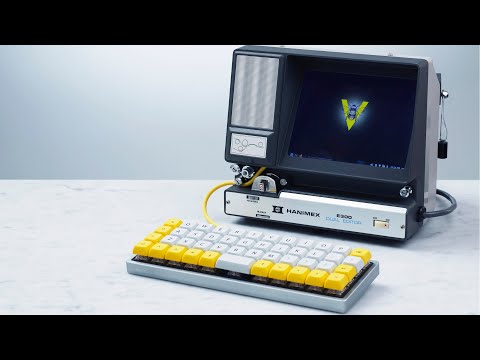
- Raspberry Pi CM5 like on the dbi-pi or any single board computer running linux with HDMI out should work
- Hanimex E300 super 8 viewer
- AC to 5V DC power supply (to attach to power switch on Hanimex) or a 5V PD trigger if you'd rather power using USBc
- 7inch 4:3 LED screen (like this CLAA070MA0ACW) (Dimensions 154 × 119,2 × 5,4)
- Step-up convertor to convert 5V to the 9V DC needed by the screen (we used an adjustable MT3608 DC-DC convertor)
- A BM40 keyboard by kprepublic. Layers set up using QMK to add mouse-emulation keys for those surprisingly rare moments that call for a mouse.
The shell is mostly empty, other than a bulb, a transformer, a lens and a plastic screen. These are easily removed (make sure you keep them in case you ever want to convert it back to a super 8 viewer).
Assembly will be influenced by the parts that you decide to use. One thing you are likely to need to do is to file away some metal to get the screen to fit. This part is tedious, but with the right tools (we used a simple metal file), it makes for a zen (long, boring) hour of crafting.
Earlier iterations used Manjaro Linux (from the Raspberry Pi imager) but more recently vanilla RaspiOS was used and everything was done in a framebuffer-enabled console.
The screen will be slightly obscured by the edges of the frame. This can be fixed by adding overscan values to /boot/firmware/cmdline.txt.
For example:
video=HDMI-A-2:800x600M@60,margin_left=40,margin_right=10,margin_top=40,margin_bottom=16
Some things to make these a little easier to navigate are in the cheat-sheets directory. In no particular order:
I recently discovered that my 1990s terminal toolkit is starting to look a bit dated. This post describes a modern set of equivalents (fd, rg, bat, eza) as well as a gap created by modern file volumes that has been filled since when the toolkit was first designed (zoxide and fzf).
- tmux with configuration by @samoshkin.
- Start up elaborate sessions using a single tmuxinator command.
- neomutt, a fast, flexible email client.
- GNU Privacy Guard GPG.
- IRC client, weechat.
- Getting Things Done™, Task Warrior
- ytfzf for searching YouTube videos.
- MPV for playing videos in the framebuffer.
- Multimedia content with ffmpeg
- FIM image viewer program for framebuffer.